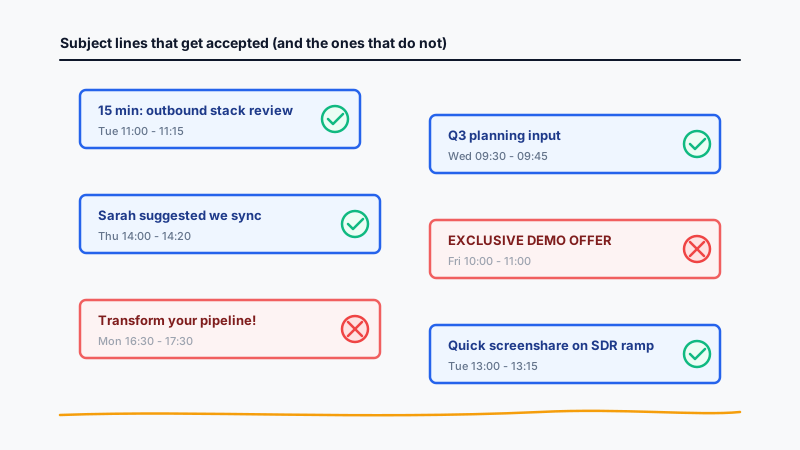
The subject line on a cold calendar invite is doing more work than the subject line on a cold email. An email subject competes for an open inside an inbox. A calendar invite subject competes for an accept inside a place where the prospect already feels protective: their own working calendar. Get it wrong and the invite is declined in three seconds, often before the description is ever read.
Most sales teams write calendar invite subject lines the same way they write email subject lines. That is the mistake. Calendar previews are shorter, the cognitive context is different, and the social risk to the prospect (an accepted invite shows up to coworkers in shared calendars) is higher. The templates below are patterns that consistently outperform generic subject lines in cold demo-booking campaigns.
Why Calendar Invite Subject Lines Matter More Than Email Subject Lines
Three structural realities make the calendar subject line carry more weight than its email counterpart.
The calendar preview is short and unforgiving. Most calendar clients (Google Calendar, Outlook, Apple Calendar) show only the title and time slot in the day or week view. There is no preview pane, no first line of body copy, no sender bio. The subject line is essentially the entire pitch.
Decline-on-sight is the default reflex. Inside an inbox, the worst outcome of a bad subject line is being ignored. Inside a calendar, the worst outcome is an active decline, and a declined invite cannot easily be re-sent without looking desperate.
Reputation in shared calendars is real. Many B2B prospects have calendars visible to assistants, managers, or teammates. An invite titled “EXCLUSIVE DEMO OFFER” creates social embarrassment when it shows up next to a board prep meeting. Prospects decline invites that make them look like the kind of person who accepts cold sales meetings.
The implication: subject lines that look like internal meetings get accepted. Subject lines that look like marketing artifacts get declined.
Structural Rules Before You Pick a Template
Every template below follows the same underlying rules. If you ignore the rules, the templates will not save you.
Under 50 characters. Calendar week views often truncate at 30-40 characters. Aim for 30-45 characters as the working target.
No marketing buzzwords. Words like “transform,” “revolutionize,” “unlock,” “synergy,” and “leverage” telegraph a sales pitch. Internal meetings never use these words.
Looks like an internal meeting. Read the subject line out loud. Does it sound like something a coworker would send? Internal meetings are short, specific, and reference a real topic.
No emoji, no all-caps, no exclamation points. Calendar previews render emoji inconsistently, all-caps reads as shouting, and exclamation points are a tell that this is not a colleague.
One concrete reference point. A specific number, a named topic, a mutual contact, or a quoted phrase. Generic invites get declined; specific ones get accepted.
With those rules established, here are 12 templates organized into 4 categories: curiosity-driven, problem-stated, referral or social-proof, and quick-call or format-led.
Category 1: Curiosity-Driven Subject Lines
Curiosity-driven subjects work when you have insight into the prospect’s situation but cannot reveal everything in 50 characters. The goal is to open a loop the prospect feels compelled to close.
Template 1: “Question about {specific_internal_artifact}”
Template: Question about your {team} hiring plan
When to use it: When you have evidence of a recent change at the prospect’s company (a hiring spree, a product launch, a tooling change) that connects to your offer.
Why it works: The word “question” frames the meeting as low-stakes consultation rather than a pitch. Referencing a specific artifact signals that you have done research.
Variation: Question re: your new SDR hires
Template 2: “{Number} thing about {their_topic}”
Template: One thing about your outbound stack
When to use it: When you have a non-obvious observation about how they currently operate, inferred from job postings, public engineering blogs, or product pages.
Why it works: The number creates a contained, specific promise. “One thing” feels manageable; “three things” feels like a deck.
Variation: Two notes on your demo flow
Template 3: “{Their_competitor} comparison notes”
Template: {Competitor} vs you, comparison notes
When to use it: When the prospect is actively evaluating or recently switched off a known competitor.
Why it works: Prospects in evaluation cycles will accept any meeting that promises competitive context. The framing positions you as a peer providing intel, not a vendor pitching.
Variation: Notes on the {Competitor} migration
For competitor signal data, CAM tracks competitor product changes, pricing updates, and outages so reps know exactly when to send these comparison-themed invites.
Category 2: Problem-Stated Subject Lines
Problem-stated subjects work when you can name the prospect’s pain in language they would use internally. These convert hardest because they require accurate diagnosis, but they also produce the highest accept rates when done well.
Template 4: “{Specific_metric} discussion”
Template: Reply rate discussion
When to use it: Sales operations, marketing, and revenue leaders. Pick a metric they own (reply rate, demo-to-close rate, pipeline coverage, CAC payback).
Why it works: Internal meetings are often named after the metric they are trying to fix. The format feels native.
Variation: Pipeline coverage working session
Template 5: “{Their_pain_in_their_words}”
Template: SDR ramp time fix
When to use it: When you have specific evidence the prospect is grappling with this problem (a recent post, a job posting, a public earnings call comment).
Why it works: Calendar invites that name a problem in 3-5 words sound exactly like internal meetings called by managers trying to solve something.
Variation: Outbound deliverability fix
Template 6: “{Quarter} planning input”
Template: Q3 planning input
When to use it: Two to four weeks before the start of a fiscal quarter. Best for VP and director-level prospects doing planning at that moment.
Why it works: Planning windows are when budget and tooling decisions actually get made. A subject line that slots into planning gets accepted because the prospect needs inputs.
Variation: FY26 budget input
Before any cold campaign with these lines, validate your contact list. Calendar invites sent to invalid addresses bounce in ways that hurt your sending domain. Running the list through Scrubby keeps the bounce rate low and your calendar sender reputation intact.
Category 3: Referral and Social-Proof Subject Lines
Referral subjects have the highest accept rates of any category, often 2-3x the others, but they require legitimate connection. Never fake a name or relationship; calendar invites are easy to verify and the reputational damage is permanent.
Template 7: “{Mutual_contact_first_name} suggested we sync”
Template: {First_name} suggested we sync
When to use it: When a customer or known mutual connection has actually told you to reach out. Always confirm with the referrer first.
Why it works: A first name in the subject line creates immediate context. The prospect’s brain searches for the name before reading further, which means the invite gets read instead of declined.
Variation: {First_name} mentioned your team
Template 8: “Intro from {Mutual_connection}”
Template: Intro from {Name}
When to use it: When a mutual connection has formally introduced you, even by email. The calendar invite is the natural next step.
Why it works: It answers the prospect’s first question (why am I getting this?) before they ask it, and signals that declining has social cost.
Variation: Following {Name}'s intro
Template 9: “{Peer_company} use case”
Template: How {Peer_company} solved {problem}
When to use it: When you have a customer in the prospect’s competitive set or peer group whose use case is genuinely similar.
Why it works: B2B buyers track what their peers are doing. A subject line that promises specific peer intelligence converts because it offers something the prospect cannot easily get elsewhere.
Variation: {Peer_company}'s outbound playbook
Category 4: Quick-Call and Format-Led Subject Lines
Format-led subjects pre-negotiate the meeting parameters in the subject line itself. They lower friction by making the commitment feel small and bounded.
Template 10: “15 min: {topic}”
Template: 15 min: outbound stack review
When to use it: Default option for most cold campaigns. Works across seniority levels and industries.
Why it works: The duration is the first thing the prospect sees. Fifteen minutes feels like a coffee, not a commitment.
Variation: 20 min walkthrough: {feature}
Template 11: “Quick {format} on {topic}”
Template: Quick screenshare on {topic}
When to use it: When the meeting genuinely is a screenshare or single-deck walkthrough rather than a discovery call.
Why it works: Naming the format (“screenshare,” “demo walkthrough,” “diagnostic”) sets accurate expectations. Prospects accept what they understand and decline what feels open-ended.
Variation: Quick diagnostic: {their_problem}
Template 12: “{Day} {time}: {topic}”
Template: Tue 11am: SDR tooling review
When to use it: When you are confident in the time slot (often after a prior LinkedIn message or warm signal) and want to compress the negotiation.
Why it works: The subject line behaves like a one-line proposal. The format feels exactly like an internal meeting already scheduled by a teammate.
Variation: Thu 2pm: pipeline review
Subject Lines to Avoid
The fastest way to lose accept rate is to use any of these patterns. They look like marketing artifacts and they trigger the decline-on-sight reflex.
Sales-speak openers. “Transform your pipeline,” “Unlock 10x growth,” “Revolutionize your outbound.” These phrases never appear in internal meeting titles and they immediately flag the invite as cold.
ALL-CAPS WORDS. “URGENT,” “IMPORTANT,” “EXCLUSIVE.” All-caps in calendar previews reads as desperate.
Emoji-heavy titles. “Demo time! :rocket: :calendar: :star:”. Calendar clients render emoji inconsistently, and even when they render correctly, the visual noise is a tell.
Generic “demo” subjects. “Demo,” “Product demo,” “Demo with {Vendor}.” These confirm the prospect’s worst fear: they were targeted by a sales sequence.
Mystery subjects. “Re: our conversation” when there was no conversation, or “Following up” when nothing preceded. These are easy to verify and they damage trust permanently.
Long descriptive titles. “Discussion about how our platform can help your team improve revenue operations efficiency.” Truncates at the worst possible point in the preview and gets declined before it is read.
A/B Testing Your Subject Lines
Most teams measure subject line performance by treating accept rate as the primary metric. Open rate is irrelevant for calendar invites; the prospect either accepts, declines, or ignores. Here is the testing framework.
Run paired tests, not free-for-alls. Pick two subject lines from the same category, send each to 100 matched prospects, hold every other variable constant (description, time slot, day of week, sender). Measure accept rate after seven days.
Statistical sample size. Below 100 sends per variant, you are reading noise. Below 5 percentage points difference in accept rate at n=100, the result is rarely significant.
Measure the funnel, not just the accept. A subject line that produces a 25% accept rate but a 15% show rate is worse than one that produces 18% accept and 70% show. Track accept rate, attendance rate, and completed-meeting rate together.
Segment by seniority. Subject lines that work for SDR managers fail for VPs of Sales. Format-led subjects (“15 min: …”) tend to win at IC and manager level; problem-stated subjects (“Q3 planning input”) tend to win at director and VP level.
Iterate weekly. Subject lines decay. A pattern that wins this quarter may flatline next quarter as more vendors copy it. Build a subject line backlog and rotate fresh patterns into testing.
For teams running calendar invite outreach at scale, the practical workflow is to maintain a library of approved subject line templates, run paired tests at the campaign level, and pipe acceptance data back to a dashboard. Kali handles the calendar-first send infrastructure, including subject line randomization across variants and accept-rate tracking by template, so the testing loop runs without spreadsheet babysitting.
Closing Notes
The best-performing calendar invite subject lines are short, concrete, and indistinguishable from the kind of meeting a coworker would send. Pick a template that matches your level of insight into the prospect, run paired tests with adequate sample size, and measure accept rate as the only metric that counts.