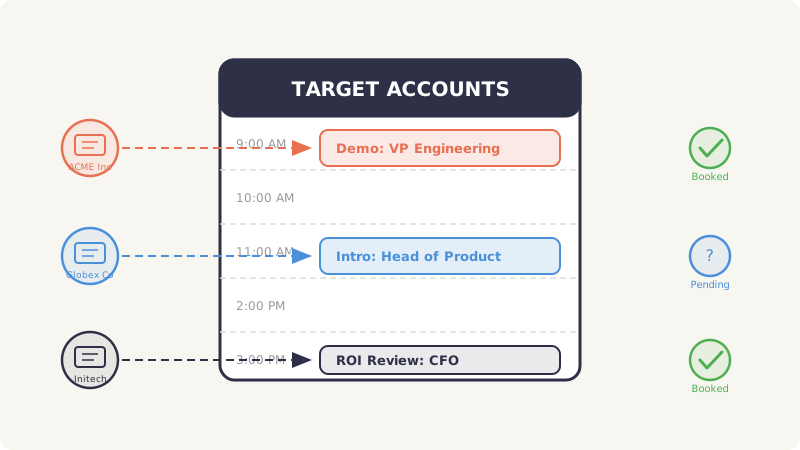
Account-based marketing is built on one premise: concentrate your resources on the accounts that matter most and engage them with precision. Most ABM teams execute that vision through display ads, targeted emails, and LinkedIn touches. These channels work, but they all share the same limitation. They compete for attention inside crowded feeds and inboxes where your message is one of dozens your prospect sees that hour.
Calendar invites operate in a fundamentally different space. When a calendar invite arrives, it does not land in an inbox to be scanned and archived. It appears on the prospect’s calendar, sitting alongside their team standups, board prep, and one-on-ones. That placement creates a psychological weight that no email, no matter how well-written, can replicate.
For ABM practitioners running campaigns against high-value target accounts, calendar invites represent an underused channel that combines the personalization ABM demands with a delivery mechanism that prospects cannot easily ignore. This guide covers how to integrate calendar invites into your ABM campaigns, from account segmentation through measurement.
Why Calendar Invites Are Uniquely Suited for ABM
ABM is not spray-and-pray. It is a focused strategy where every touchpoint needs to feel intentional, relevant, and tailored to the specific account. Calendar invites align with these requirements better than most outreach channels for several reasons.
They Demand a Decision
An email can sit unread for weeks. A LinkedIn message can be ignored indefinitely. A calendar invite, by contrast, sits visibly on a prospect’s schedule until they take action: accept, decline, or mark as tentative. That forced decision loop means your outreach gets conscious attention rather than passive deletion. Even a decline is a form of engagement that tells you the prospect saw your message and made an active choice.
They Signal Peer-Level Interaction
Enterprise buyers are conditioned to treat cold emails as sales pitches. Calendar invites carry a different connotation. Internally, people send calendar invites to colleagues, partners, and leadership. When a well-crafted invite arrives from an outside sender, it borrows some of that internal credibility. The format itself suggests a meeting between equals, not a vendor pitch.
They Support Deep Personalization
The calendar invite format (title, description, time, location, attendees) gives you multiple fields to personalize. You can tailor the meeting title to a specific business challenge, write a description that references the account’s recent initiatives, propose a time that aligns with their planning cycle, and even include a relevant attendee from your side (like a solutions engineer who specializes in their industry). This level of customization is exactly what ABM requires.
They Create a Physical Presence
Display ads disappear when the prospect navigates away. Emails get buried. A calendar invite persists on the prospect’s calendar, serving as a recurring visual reminder every time they check their schedule. Even if they have not accepted it, they see it. That repeated exposure compounds over days, reinforcing your brand and message.
How to Segment Target Accounts for Calendar Invite Campaigns
Not every account in your ABM list should receive calendar invites. This channel is high-touch and high-stakes (a poorly targeted invite burns your credibility), so segmentation matters more here than with any other ABM tactic.
Tier Your Accounts by Fit and Intent
Start with a three-tier framework:
- Tier 1 (1:1 ABM): Your top ten to twenty accounts where you are running fully customized campaigns. Every calendar invite for these accounts should be individually researched and personalized. Reference specific company initiatives, recent funding rounds, leadership changes, or product launches.
- Tier 2 (1:Few ABM): Clusters of twenty to fifty accounts grouped by industry, company size, or shared pain points. Calendar invites here can follow templates but should still include account-specific details in the description (the company name, their industry challenge, a relevant case study).
- Tier 3 (1:Many ABM): Broader lists of one hundred or more accounts. Calendar invites at this tier work best as part of a multi-touch sequence where the invite follows a warm-up email or ad impression. Personalization focuses on industry and role rather than individual account details.
Identify the Right Contacts Within Each Account
ABM is about reaching the buying committee, not just one person. For each target account, map out the key stakeholders:
- The economic buyer who controls budget (VP, C-suite)
- The technical evaluator who assesses feasibility (director of engineering, IT lead)
- The end-user champion who will push for adoption (team lead, senior IC)
- The blocker who can stall deals (procurement, legal, security)
Each of these roles needs a different calendar invite angle. The economic buyer gets an ROI-focused meeting title. The technical evaluator gets a product-deep-dive framing. The champion gets a “see how teams like yours use this” approach.
Validate Contact Data Before You Send
This step is non-negotiable. Sending a calendar invite to an invalid email address means the invite vanishes silently. You will not get a bounce notification, you will not know it failed, and you will have wasted a slot in your outreach sequence. Enterprise domains frequently use catch-all email configurations, which means standard email verification tools will mark those addresses as “unknown” or “risky” rather than confirming validity.
Run your contact list through Scrubby before launching any calendar invite campaign. Scrubby specializes in validating catch-all and risky email addresses that other verification tools cannot confirm, which is critical for enterprise ABM where nearly every target domain uses catch-all configurations.
Personalization Strategies for Calendar Invites
Generic calendar invites get declined instantly. The entire value of this channel depends on making each invite feel like a relevant, thoughtful request rather than automated outreach. Here is how to personalize effectively across the key fields.
Meeting Title
The title is the first thing the prospect sees in their calendar view. It needs to be specific, relevant, and free of salesy language.
Weak: “Quick Demo of Our Platform” Better: “Reducing [Company]‘s Integration Backlog, 15-Min Overview” Best: “[First Name], [Mutual Connection] Suggested We Connect on [Specific Topic]”
For Tier 1 accounts, research the company enough to reference a real challenge. For Tier 2 and 3, use industry-specific pain points that resonate broadly across the cluster.
Meeting Description
The description field is your pitch, but it should read like a concise meeting agenda rather than a sales email. Structure it as:
- One sentence on why you are reaching out (tied to a specific account trigger or pain point)
- Two to three bullet points on what you will cover in the meeting
- One sentence on the expected outcome (“By the end, you will have a clear picture of whether X can solve Y”)
Avoid including links to marketing materials, long company descriptions, or feature lists. The description should make the prospect feel like this is a focused, valuable use of fifteen minutes.
Timing and Duration
Propose a specific time rather than asking the prospect to pick one. This removes friction and signals confidence. Choose a time that works for their time zone, falls during a likely gap in their schedule (mid-morning or mid-afternoon, avoiding Monday mornings and Friday afternoons), and is far enough out that they do not feel rushed (five to seven business days is the sweet spot).
Keep the duration to fifteen or twenty minutes. Thirty-minute requests from unknown senders feel like a significant commitment. Fifteen minutes signals that you respect their time and plan to be concise.
Attendee Strategy
For Tier 1 accounts, consider adding a second attendee from your side, such as a solutions engineer or an industry-specific account executive. This signals that you are bringing genuine expertise to the meeting, not just a sales pitch. For Tier 2 and 3, a single sender is fine to keep things simple.
Building Multi-Touch ABM Sequences with Calendar Invites
Calendar invites should not exist in isolation. They perform best as one component of a coordinated, multi-touch ABM sequence that combines channels and builds momentum over time.
The Pre-Invite Warm-Up
Cold calendar invites work, but warm calendar invites work better. Before sending the invite, create awareness through other channels:
- Days 1 to 3: Run targeted display ads to the account using your ABM platform. This creates brand recognition so your name is not completely unknown when the invite arrives.
- Days 3 to 5: Send a short, value-driven email that introduces a relevant insight or resource. Do not pitch; just provide value and plant a seed.
- Day 7: Send the calendar invite. Reference the insight from your email if possible (“Following up on the benchmark data I shared last week, I would like to walk you through how [Company] can apply those findings”).
This warm-up sequence dramatically improves invite acceptance rates because the prospect has already encountered your brand twice before the invite arrives.
The Post-Invite Follow-Up
If the invite goes unanswered after three to four days, you need a follow-up plan:
- Day 10: Send a brief email referencing the invite. “I sent over a calendar hold for [date] to discuss [topic]. If that time does not work, happy to adjust.”
- Day 14: Try a different channel entirely. A LinkedIn message or a brief voicemail that references the calendar invite shows persistence without being pushy.
- Day 21: If no response, update the invite with a new proposed time and a slightly different angle. This triggers a fresh calendar notification without sending a new invite.
For teams running these sequences at scale, Kali automates the entire calendar invite outreach workflow, from sending personalized cold calendar invites to managing follow-up sequences. This lets ABM teams focus on strategy and personalization rather than manual execution.
Coordinating Across the Buying Committee
When you are targeting multiple stakeholders within the same account, sequence your invites carefully:
- Week 1: Start with the person closest to the pain point (usually mid-level management). They are most likely to accept and give you internal intelligence.
- Week 2: Reach the technical evaluator with a different angle focused on implementation and integration.
- Week 3: Contact the economic buyer. If your Week 1 contact engaged, reference that conversation (“After speaking with [Name] on your team, I wanted to connect with you about the broader business case”).
- Week 4: Loop in additional stakeholders as needed based on what you have learned from earlier conversations.
This staggered approach lets each invite build on the last, creating internal momentum within the target account.
Measuring ABM Calendar Campaign Performance
You cannot improve what you do not measure. Calendar invite campaigns within an ABM framework need their own set of metrics that go beyond standard email KPIs.
Primary Metrics
- Invite Acceptance Rate: The percentage of sent invites that are accepted. Benchmark for well-targeted ABM campaigns is 15 to 25 percent, significantly higher than the 1 to 3 percent reply rate for cold emails.
- Meeting Completion Rate: Of accepted invites, how many actually result in a held meeting. Target 70 percent or higher. If this number is low, your timing or value proposition may need adjustment.
- Account Penetration Rate: The percentage of target accounts where you have successfully booked at least one meeting. This measures whether your ABM campaign is reaching the right accounts.
- Multi-Thread Rate: Within engaged accounts, how many distinct stakeholders have you met with? ABM success correlates strongly with multi-threading, so track this at the account level.
Secondary Metrics
- Time to First Meeting: How many days from campaign launch to the first accepted invite per account. Shorter cycles indicate strong targeting and messaging.
- Decline Rate with Feedback: Some prospects decline with a note (“Not the right time, try next quarter”). Track these because they represent warm leads for future campaigns.
- Sequence Conversion by Channel: When you run multi-touch sequences, measure which combination of channels (ad plus email plus invite, email plus invite, invite only) produces the highest acceptance rate.
Attribution Within ABM
Calendar invite meetings should be tracked as a distinct touchpoint in your ABM attribution model. Log the invite send date, acceptance date, meeting date, and outcome in your CRM. This lets you measure the incremental contribution of calendar invites compared to other ABM channels.
For teams that want a comprehensive view of their competitive positioning while running ABM campaigns, CAM provides automated competitor monitoring that can inform your calendar invite messaging. Knowing what competitors are doing helps you craft invite descriptions that highlight your specific advantages for each target account.
Common Mistakes to Avoid
Even experienced ABM teams make errors when adding calendar invites to their campaigns. Here are the pitfalls to watch for.
Sending invites without verifying emails. As mentioned earlier, invalid emails mean silent failures. Always validate before sending, especially for enterprise catch-all domains.
Using the same invite for every stakeholder. The CFO and the engineering lead have different priorities. Sending both the same meeting title and description signals that this is automated mass outreach, which defeats the purpose of ABM.
Proposing inconvenient times. Suggesting a 7 AM meeting to someone in a different time zone or a Monday 8 AM slot shows you did not do basic research. Always check the prospect’s likely time zone and propose a reasonable time.
Overloading the description. The invite description is not a landing page. Keep it to four or five sentences maximum. Long descriptions feel like marketing emails disguised as meeting requests.
Skipping the warm-up. Jumping straight to a calendar invite without any prior brand exposure reduces acceptance rates by 30 to 40 percent in most ABM campaigns. Invest in the pre-invite touchpoints.
Putting It All Together
Calendar invites give ABM teams a channel that combines the precision targeting of account-based marketing with a delivery mechanism that earns genuine attention. Unlike emails that sit unread or ads that blend into background noise, a calendar invite occupies real estate on a prospect’s schedule and forces a conscious decision.
The keys to success are rigorous account segmentation, deep personalization across every invite field, careful sequencing within multi-touch campaigns, and consistent measurement. Start with your Tier 1 accounts where you can invest the research time to craft truly personalized invites, then expand to Tier 2 and 3 as you develop templates and playbooks that scale.
For teams ready to operationalize calendar invite outreach as a core ABM channel, Kali provides the infrastructure to send, track, and optimize cold calendar invites at scale, so your ABM practitioners can focus on strategy while the platform handles execution.
The accounts that matter most deserve outreach that stands out. Calendar invites deliver exactly that.