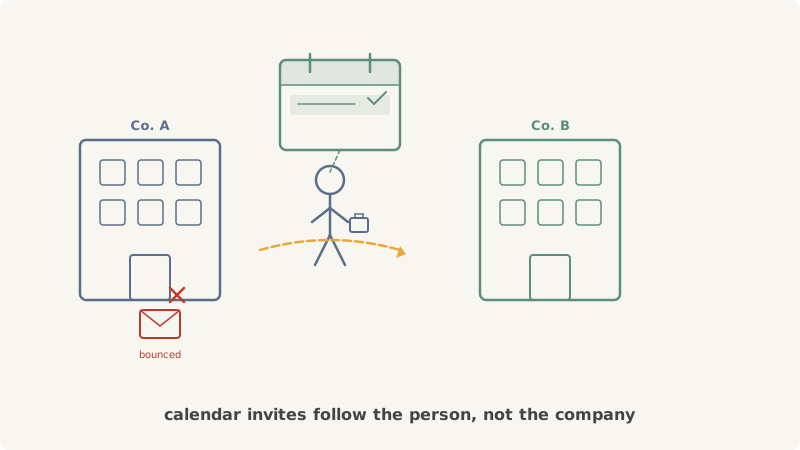
Every month, millions of professionals change jobs. For B2B sales teams, this creates a frustrating paradox: the moment a prospect becomes most receptive to new solutions — when they’re building fresh vendor stacks, evaluating new tools, and eager to make an impact at their new company — is the exact moment your carefully built email list goes stale. Their old corporate address bounces. Your CRM still shows the previous company. And by the time your data enrichment provider catches up, the window of opportunity has closed.
Calendar invites solve this problem in a way email fundamentally cannot. Here’s why, and how to use Kali to turn job changes from a pipeline killer into a pipeline accelerator.
Why Job Changes Break Email Outreach
To understand the solution, you need to understand the scope of the problem.
Your Email List Decays Faster Than You Think
B2B email databases degrade at roughly 25-30% per year. Job changes are the single largest contributor. When a VP of Marketing leaves Company A for Company B, their old email address — the one in your CRM, your sequences, and your carefully segmented lists — stops working immediately. Most companies deactivate corporate email accounts within 24 hours of an employee’s departure.
The result: a significant chunk of your prospect list is bouncing at any given time, and the prospects who bounced are disproportionately the ones in active buying mode.
Data Enrichment Lags Behind Reality
Services like ZoomInfo, Apollo, and Clearbit are excellent at tracking job changes, but they’re not instantaneous. It can take anywhere from two weeks to three months for a job change to propagate through data enrichment platforms. LinkedIn profile updates happen faster, but scraping LinkedIn at scale is unreliable and runs into API limitations.
During that gap, your prospect is settling into their new role, evaluating tools, and making purchasing decisions — all while your outreach system thinks they still work somewhere else.
The First 90 Days Are the Buying Window
Research consistently shows that new executives make the majority of their vendor decisions within the first 90 days. They’re auditing existing tools, bringing in solutions they trusted at previous companies, and establishing themselves by driving visible improvements quickly.
If your enrichment data takes 60 days to update and you need another 2-3 weeks of sequencing before a meeting is booked, you’ve already missed two-thirds of the buying window by the time you make contact.
How Calendar Invites Bypass the Stale Email Problem
Calendar invites operate on a fundamentally different delivery mechanism than email outreach, and that difference matters enormously when prospects change jobs.
Calendars Are Tied to People, Not Companies
When someone changes jobs, their corporate email dies. But their calendar identity often persists in ways that create reachability. Most professionals use Google Calendar or Microsoft Outlook, and these calendar systems are tied to personal identity layers that survive job transitions. A calendar invite sent to a prospect’s Google account reaches them regardless of which company’s Google Workspace they’re currently part of.
More importantly, many professionals maintain personal calendar accounts (Gmail, Outlook.com) that sync with their corporate calendars. A calendar invite to a personal address that was valid six months ago is likely still valid today — even if every corporate email you had for them is bouncing.
Calendar Invites Don’t Hit Spam Filters the Same Way
Cold emails from unknown senders are increasingly filtered, quarantined, or blocked entirely. Calendar invites, by contrast, arrive through a different protocol path. They show up in the calendar application directly, often with a notification. The prospect sees your meeting request as an event on their calendar, not as one more message buried in a crowded inbox.
This matters doubly for prospects who just changed jobs. New employees are configuring email filters, adjusting notification settings, and dealing with inbox overload from onboarding. A calendar invite cuts through all of that noise by arriving in a separate, less saturated channel.
The Accept/Decline Model Lowers Friction
An email asks a prospect to read, process, decide, and compose a reply. A calendar invite asks them to do one thing: accept or decline. That single-action response model is inherently lower friction, which translates directly into higher response rates. For a new hire who is already overwhelmed with onboarding tasks, a quick “accept” is far more achievable than drafting a thoughtful email reply.
A Practical Playbook for Reaching Job Changers via Calendar Invites
Here’s how to build a systematic process for using calendar invites to reach prospects during the critical job-change window.
Step 1: Monitor Job Change Signals
Set up tracking for job changes among your target prospects and accounts. Useful signals include:
- LinkedIn notifications: Follow key prospects and enable alerts for role changes. LinkedIn Sales Navigator makes this easier at scale with “Job Change” alerts for saved leads.
- CRM bounce tracking: When emails in your sequences start hard bouncing, that’s a strong indicator that someone has left their company. Don’t just suppress the contact — flag them for calendar-based re-engagement.
- News and press releases: Executive hires at target accounts are often announced publicly. Set up Google Alerts for “[target company] hires” or “[target company] VP” to catch these early.
- Data enrichment alerts: Tools like ZoomInfo and Apollo offer job change notifications. Even though the data lags, it’s still a useful signal to trigger calendar outreach.
The goal is to identify job changes as early as possible and move fast.
Step 2: Find a Reachable Calendar Address
Once you’ve identified a job change, you need a calendar address that still works. Options include:
- Personal email addresses: If you captured a personal Gmail or Outlook address at any prior point — from a webinar registration, a content download, or a prior conversation — use it. Personal calendar addresses rarely change.
- New corporate email: If the job change has been publicly announced, you can often construct the new email address from the target company’s email format. Tools like Hunter.io help here.
- LinkedIn profile to email inference: Many data providers can map a LinkedIn profile to an active email address, even shortly after a job change.
With Kali, you can send calendar invites directly once you have a valid address. The platform handles the calendar protocol delivery so your invite arrives as a proper calendar event, not a clunky ICS attachment in an email.
Step 3: Craft the Right Invite for a Job Changer
The messaging for a job-change calendar invite needs to be different from a standard cold outreach invite. You’re reaching someone at a specific inflection point, and the invite should reflect that.
Subject line: Reference the transition directly. Examples:
- “Congrats on [New Company] — 15 min on [relevant topic]”
- “Quick intro — [Your Product] x [New Company]”
- “[First Name] — new role resource for [specific pain point]”
Description: Keep it concise and relevant to their new situation. A strong structure:
- Acknowledge the job change (one sentence)
- Connect your solution to a challenge they likely face in the new role (two sentences)
- State what the meeting covers and why it’s worth 15 minutes (one sentence)
- Give them an explicit out: “If timing doesn’t work, decline and I’ll follow up in a few weeks”
Duration: Keep it to 15 minutes. New hires have packed schedules. A short commitment is much easier to accept.
Timing: Aim for a slot 3-5 business days out. Close enough to feel relevant, far enough out that they can fit it in.
Step 4: Time Your Outreach to the Job Change Window
Timing matters more than almost any other variable in job-change outreach. Here’s what works:
- Days 1-14 after the change: Too early for most outreach. The prospect is onboarding, meeting their team, and not yet evaluating external tools. Exception: if you had a strong prior relationship, reaching out in the first week with a genuine congratulations and a soft meeting request can work well.
- Days 15-45: The sweet spot. The prospect has enough context to understand their new challenges but hasn’t committed to vendors yet. This is when your calendar invite should land.
- Days 45-90: Still viable but increasingly competitive. Other vendors have caught up. Your messaging needs to be sharper and more specific to stand out.
- Days 90+: You’ve likely missed the primary buying window. Not worthless, but treat it as standard cold outreach rather than a job-change play.
Step 5: Build a Multi-Touch Sequence Around the Invite
A single calendar invite is effective, but a structured sequence is better.
Day 1: Send the calendar invite via Kali. No email, no LinkedIn message — just the invite. Let it arrive cleanly.
Day 3: If no response, send a brief LinkedIn connection request or message referencing the invite. “Sent you a calendar invite for a quick intro — thought [specific topic] might be relevant as you get settled at [New Company].”
Day 7: If the invite was declined or ignored, send a second invite with a different time slot and slightly adjusted messaging. Reference a specific pain point or case study relevant to their new company.
Day 14: Final touch — a short, direct email to their new address (if you have it) or LinkedIn message. “Last note on this — happy to connect whenever timing works. Here’s a 2-min overview of what we do: [link].”
This sequence uses the calendar invite as the anchor and supplements it with lighter touches on other channels.
Why This Matters More Than Ever
The average tenure at a B2B company continues to shrink. Executives change roles every 2-3 years, and mid-level managers even more frequently. Every job change in your target market is both a risk (lost contact) and an opportunity (new buying window).
Sales teams that rely exclusively on email outreach will keep losing pipeline to job changes — spending money on data enrichment to catch up after the window has already closed. Teams that add calendar invites to their job-change playbook reach prospects through a channel that follows the person, not the company email address.
Kali was built for exactly this kind of outreach. Instead of waiting for your email list to catch up to reality, send a calendar invite that meets the prospect where they are — in their calendar, at their new company, during the exact window when they’re most open to new conversations.
The best time to reach a prospect who changed jobs is before your competitors realize they changed jobs. Calendar invites make that possible.