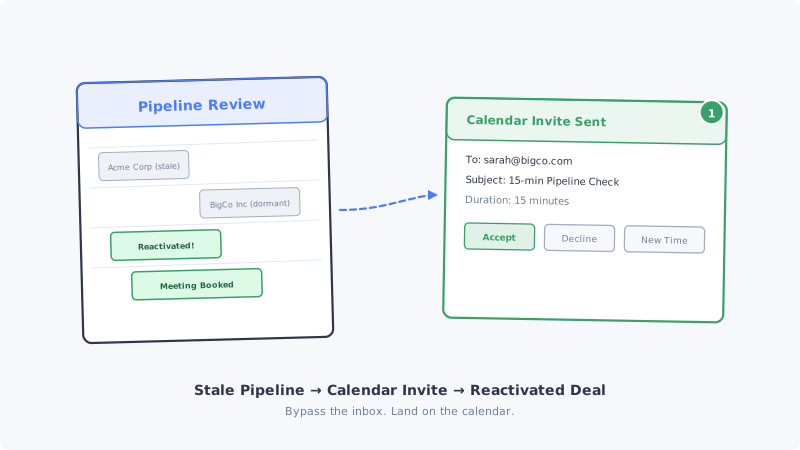
Every B2B sales team has them. Opportunities that looked promising two months ago, went through discovery, maybe even received a proposal, and then went silent. The prospect stopped responding to emails. The deal sat in “negotiation” or “evaluation” stage long past its expected close date. Eventually someone moved it to “closed-lost” or just left it sitting in the CRM, gathering digital dust.
These are not dead deals. They are dormant deals. The prospect still has the problem your product solves. Their budget cycle may have shifted. A competing priority may have taken their attention. Or your follow-up emails simply got lost in a flooded inbox.
The challenge is not whether these deals can be revived. It is how you cut through the noise to restart the conversation. And the most effective tool for that is one most sales teams overlook for reactivation: the calendar invite.
Why Follow-Up Emails Fail on Stale Pipeline
When a deal goes cold, the instinct is to send more emails. A “just checking in” message. A “wanted to circle back” note. Maybe a case study or a new feature announcement as an excuse to re-engage.
The problem is that these emails compete in the same channel where the prospect already stopped engaging. If they ignored your last three emails, the fourth one faces the same inbox dynamics: buried under 200 other messages, filtered by priority algorithms, or mentally categorized as “I will get to that later” (which means never).
Email open rates for reactivation sequences are dismal. Industry data consistently shows that re-engagement email campaigns perform 40 to 60 percent worse than initial outreach sequences. The prospect has already tuned out your email address. Their inbox has effectively learned to deprioritize you.
“Checking in” provides no value. The prospect knows you want to sell them something. A follow-up email that says “just wanted to see where things stand” gives them nothing new to respond to. It creates a social obligation without a compelling reason to act.
Timing is random. You send the email when it is convenient for you, not when the prospect is actively thinking about the problem. The message arrives, gets glanced at, and gets buried.
Why Calendar Invites Work for Reactivation
Calendar invites operate in a fundamentally different channel with different psychology. They appear directly on the prospect’s calendar, not just in their inbox, which makes them their most action-oriented workspace.
Calendar invites demand a decision. When an invite appears, the prospect has three options: accept, decline, or propose a new time. All three are responses. Even a decline is an engagement signal that tells you the prospect is alive and aware. Compare that to an email that can be silently ignored indefinitely.
Calendar invites create time commitment, not just attention. An email asks the prospect to read something now. A calendar invite asks them to commit a specific block of time in the future. That reframing shifts the interaction from “respond to this message” to “is this worth 15 minutes of my time next week?” The bar feels lower because the action is deferred.
Calendar notifications persist. A calendar invite generates multiple touchpoints without you sending multiple messages: the initial notification, the calendar entry itself visible during weekly planning, and the reminder notification before the meeting. One send creates three or more moments of visibility.
The professional context is different. Calendar invites feel more formal and intentional than email. A prospect who would ignore a casual email may take a calendar invite more seriously because it signals that you have a specific agenda and a defined time commitment, not just an open-ended “let’s chat.”
Structuring the Reactivation Calendar Invite
The invite itself needs to be crafted differently than a cold outreach invite. The prospect has context on who you are and what you sell. The goal is to acknowledge the gap, offer a reason to reconnect, and make it easy to say yes.
Subject line: Be specific about the agenda. Do not use vague subjects like “Quick catch-up” or “Reconnect.” Instead, reference something concrete: “Pipeline Review: [Company] + [Your Product] Status” or “15-min Check: Has [Specific Problem] Moved Up the Priority List?”
The subject line should make the prospect think “yes, I should probably address this” rather than “this is another sales follow-up.”
Description: Lead with new value. The invite description is your pitch. Structure it in three parts:
- Acknowledge the gap without blame. “We last spoke in February about [specific topic]. I know priorities shift and timing is not always right.”
- Introduce something new. A product update, a relevant case study, a market trend, or competitive intel that was not available during the original conversation.
- Define the ask clearly. “This is a 15-minute call to see if [original problem] is still on your radar and share [new thing]. No commitment beyond the conversation.”
Duration: Keep it short. Fifteen minutes. Maybe twenty. Not thirty. A stale deal reactivation is a temperature check, not a full discovery call. Short meetings are easier to accept because the commitment feels minimal.
Timing: Choose strategically. Send the invite for a slot 3 to 5 business days out. Too soon feels pushy. Too far out lets the prospect forget or cancel. Mid-week mornings (Tuesday through Thursday, 10 AM to 11 AM in their time zone) consistently show the highest acceptance rates.
Segmenting Your Stale Pipeline for Calendar Outreach
Not every dormant opportunity deserves a calendar invite. Sending invites indiscriminately wastes the channel’s effectiveness and risks annoying prospects who genuinely are not interested.
Tier 1: High-value deals that went dark after proposal. These prospects have the most context and the highest potential. They saw pricing, may have gotten internal approval partially, and went silent for reasons that may have been resolved. These get your most personalized calendar invites with specific references to their proposal and any updates since.
Tier 2: Deals that stalled after discovery. The prospect confirmed a problem and explored solutions but never moved to evaluation. Calendar invites here should reference the original pain point and introduce a new angle: “Since we spoke, we have helped three companies in [their industry] solve [their problem]. Worth a 15-minute update?”
Tier 3: Early-stage conversations that faded. These prospects had one or two interactions but never progressed deeply. Calendar invites here need a stronger hook because the relationship foundation is thinner. Pair the invite with a new piece of content or competitive intelligence relevant to their business.
Do not send calendar invites to: Prospects who explicitly said “not interested” or “do not contact me again.” Prospects whose companies have had significant negative changes (layoffs, bankruptcy). Contacts who have left the company since your last interaction (check LinkedIn first).
The Multi-Channel Reactivation Sequence
A calendar invite should not be a standalone tactic. It works best as part of a coordinated multi-channel approach.
Day 1: Send the calendar invite. Use Kali to send the invite directly to the prospect’s calendar. The invite appears as a tentative meeting, immediately visible in their weekly view.
Day 2: LinkedIn touchpoint. View their profile, engage with a recent post, or send a brief connection message referencing the invite. “Sent over a calendar invite for a quick pipeline check. No pressure, but thought it was worth reconnecting.”
Day 4: Brief email (only if no response to invite). A short, direct email acknowledging the invite and offering to reschedule if the time does not work. Keep it to three sentences maximum.
Day 7: Adjust or withdraw. If no response across any channel, withdraw the calendar invite gracefully. You can try again in 30 to 60 days with a different angle. Leaving a declined or ignored invite on their calendar indefinitely feels intrusive.
Handling Responses to Reactivation Invites
Each response type requires a different follow-up approach.
Accepted: The prospect wants to talk. Prepare thoroughly. Review your CRM notes, check their company’s recent news, and walk into the call with a specific agenda. Do not waste the meeting with “so, where were we?” Start with the new value you promised in the invite description.
Declined with a note: This is still a win. A decline with “not the right time” or “maybe next quarter” gives you timing intelligence. Note it in your CRM, set a reminder, and follow up accordingly. A decline with “we went with a competitor” gives you competitive intel and an opportunity to ask what influenced their decision.
Declined without a note: Neutral signal. The prospect saw the invite and made a conscious choice. Wait 30 days and try a different approach. Do not send another calendar invite immediately.
Proposed a new time: The best possible response. The prospect is actively engaging and wants to meet, just not at your suggested time. Accept their proposed time immediately and confirm with a brief note.
No response after 48 hours: The invite is sitting on their calendar as tentative. Follow up via a different channel (email or LinkedIn). If still no response by day 7, withdraw the invite.
Cleaning Your Contact Data Before Reactivation
Before running a reactivation campaign, verify that your contact data is still valid. Stale pipeline means stale data. Prospects may have changed email addresses, left the company, or switched roles.
Run your reactivation list through Scrubby to validate email addresses, especially catch-all domains where standard validators cannot confirm deliverability. Sending calendar invites to invalid email addresses does not just waste your time; it can trigger bounce notifications that flag your domain.
For LinkedIn outreach components, verify that the prospect’s profile is still active and that they are still at the same company. A calendar invite referencing a conversation from their previous role is worse than no outreach at all.
Measuring Reactivation Campaign Effectiveness
Track these metrics to evaluate whether calendar-based reactivation is working:
Acceptance rate. What percentage of calendar invites are accepted? For reactivation (not cold outreach), target 15 to 25 percent. Anything below 10 percent suggests your targeting or messaging needs adjustment.
Response rate (including declines). Any response is engagement. Track the total response rate across accepts, declines, and reschedule requests. For reactivation campaigns, 30 to 40 percent total response rate is strong.
Meeting-to-opportunity conversion. Of the meetings that happen, how many result in a reopened or new opportunity? This tells you whether your pipeline is genuinely recoverable or whether these deals were correctly marked as lost.
Revenue reactivated. The bottom line metric. Track closed-won revenue from reactivated deals separately from new pipeline. This makes the ROI of reactivation campaigns concrete and justifies continued investment.
Competitive Intelligence for Better Reactivation Timing
The best reactivation outreach happens when the prospect is actively re-evaluating their options. Monitoring competitive signals with tools like CAM can tell you when a prospect’s current vendor makes changes (pricing updates, feature removals, negative reviews) that might reopen the buying conversation.
If you lost a deal to a competitor six months ago and that competitor just raised prices or deprecated a key feature, your reactivation calendar invite carries significantly more weight. The prospect is already thinking about alternatives. Your invite arrives at exactly the right moment.
Key Takeaways
Stale pipeline is not dead pipeline. The deals went dormant, not extinct. The prospects still have problems, budgets, and decision-making authority. What they stopped doing is responding to your emails.
Calendar invites bypass the channel where engagement died and create a new interaction dynamic: one that demands a decision, commits a defined time block, and persists through multiple notification touchpoints.
Segment your stale pipeline by deal stage, personalize your invite descriptions with new value, and coordinate calendar outreach with LinkedIn and email touches. Track acceptance rates and revenue reactivated to prove the ROI.
The pipeline you have already built is the cheapest pipeline you will ever generate. A 15-minute calendar invite is often all it takes to bring it back to life.