You had them. The prospect opened your first email. Maybe they clicked a link. Maybe they even replied — something short like “interesting, let me look into this.” Then nothing. Your follow-up emails went unanswered. Your second follow-up got ignored. By the third, you were writing subject lines like “Just checking in” and feeling the deal slip away.
This is the single most frustrating scenario in outbound sales. Not the hard no. Not the bounce. The prospect who showed interest and then vanished. They are sitting in your CRM right now — dozens, maybe hundreds of them — tagged as “went dark” or “no response” or whatever label your team uses for deals that died quietly.
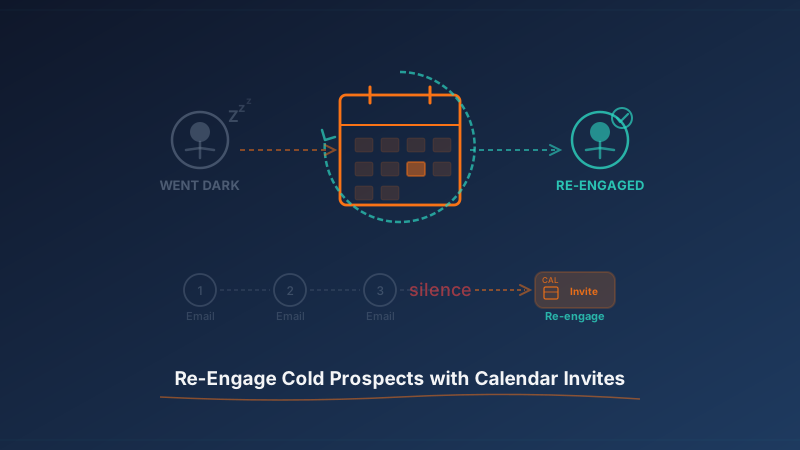
Email is not going to bring them back. But a calendar invite might.
Why Email Follow-Ups Stop Working After 3-4 Touches
There is a reason your follow-up emails are not getting replies, and it is not because your copy is bad. It is because the channel itself has hit diminishing returns with that specific prospect.
Here is what happens sequentially. Your first email lands and gets attention — the prospect opens it, maybe reads it. Your second email gets a glance. By the third, the prospect’s brain has categorized your name as “sales outreach I am not ready to deal with.” Every subsequent email gets filtered — not by Gmail, but by the prospect’s own mental inbox triage. They see your name, register it as a follow-up they do not want to engage with, and archive it without reading.
This is not about being annoying. It is about channel fatigue. The prospect made a micro-decision to not reply after your first or second email, and each subsequent message reinforces that decision. You are now stuck in a pattern where more emails equal less attention.
The data confirms this. Reply rates on email sequences drop by roughly 50% between touch 2 and touch 4. By touch 5, you are statistically sending messages into a void. The prospect has not rejected your value prop — they have rejected the format of your outreach.
That is the opening a calendar invite exploits.
Why Calendar Invites Cut Through Inbox Noise Differently
A calendar invite does not arrive in the inbox the same way an email does. Technically, yes, it shows up in email. But it also does something no email can: it places an event on the prospect’s calendar and triggers a distinct notification.
This matters for three reasons:
- Different visual pattern. Calendar notifications look different from email notifications on every device and every client. The prospect’s brain has learned to skip your emails. It has not learned to skip your calendar invites because you have never sent one. You are breaking the pattern.
- Implied commitment. An email is a request to read. A calendar invite is a request to decide. Accept or decline. The binary nature of the action changes how the prospect processes it. They cannot just “mark as read” and move on the same way.
- Persistent visibility. An email gets buried under new emails within hours. A calendar invite stays on the prospect’s calendar until they actively remove it. Every time they open their calendar to check their schedule, your proposed meeting is sitting there. That kind of repeated, passive exposure is something no email follow-up can replicate.
- Lower perceived effort. The prospect does not have to compose a reply, figure out what to say, or commit to a long exchange. They just click accept. The friction to re-engage is dramatically lower than typing out a response to a follow-up email.
For prospects who went dark specifically because they got busy or deprioritized your outreach — not because they were uninterested — a calendar invite gives them the easiest possible path back to the conversation.
When to Send the Calendar Invite in Your Sequence
Timing is everything with re-engagement calendar invites. Too early and it feels aggressive. Too late and the prospect has completely forgotten who you are. Here is the framework that works.
Wait 5-10 business days after your last unanswered email. This gap is intentional. You want enough time to pass that the prospect does not feel hounded, but not so much time that the earlier engagement has completely faded from memory. If they opened your emails or replied once, that memory has a shelf life of roughly two weeks before it goes cold entirely.
Send the invite on a Tuesday, Wednesday, or Thursday. Mondays are packed with catch-up. Fridays are wind-down mode. Midweek is when prospects are most likely to be in planning mode, checking their calendar, and open to scheduling something.
Propose a meeting 4-6 business days in the future. Do not propose tomorrow — that is too aggressive for a re-engagement touch. Do not propose three weeks out — that signals low urgency. A meeting slot roughly one week out hits the right balance of “this is real” without creating pressure.
Target 10 AM or 2 PM in the prospect’s time zone. These are the two time slots with the highest accept rates for cold-booked meetings. Mid-morning and early afternoon are natural meeting times that feel organic rather than forced.
Before sending calendar invites to a stale list, make sure those email addresses are still valid. People change jobs, companies restructure, and emails bounce. Run your re-engagement list through Scrubby to validate every address first. There is no point sending a calendar invite to an email that no longer exists — and bounced invites hurt your sender reputation just like bounced emails do.
Subject Line Formulas That Get Calendar Invites Accepted
The subject line of your calendar invite is the event title — it is what the prospect sees in their calendar app, in the notification on their phone, and in the email notification. It has to do a lot of work in very few words.
Here are the formulas that consistently drive the highest accept rates for re-engagement invites:
The “Quick Sync” Formula: “Quick sync: [specific topic relevant to their role]” Example: “Quick sync: reducing Q2 churn in your onboarding flow”
The “Following Up” Formula: “Following up: [reference to earlier conversation or email topic]” Example: “Following up: the analytics gap you mentioned”
The “15 Min” Formula: “15 min — [benefit or outcome they care about]” Example: “15 min — how [similar company] cut CAC by 30%”
The “Reschedule” Formula (when they previously showed intent): “Reschedule: [topic] catch-up” Example: “Reschedule: pipeline automation catch-up”
What to avoid: generic titles like “Meeting” or “Call with [Your Company].” These look like spam and give the prospect no reason to engage. Also avoid anything that sounds automated or mass-produced. The subject line should read like something a human would type when booking a meeting with a colleague.
What to Put in the Invite Description
The description field of your calendar invite is your pitch. But it needs to be shorter than any email you have ever written. Three to five sentences maximum. Here is the structure:
Sentence 1: Acknowledge the gap. Do not pretend the silence did not happen. Something like “I know things get busy and timing does not always line up” works. This signals self-awareness and removes any guilt the prospect might feel about not replying.
Sentence 2: Reference the earlier engagement. Remind them why they were interested in the first place. “You had mentioned looking into X” or “When we last connected, you were exploring solutions for Y.” This re-establishes context without making them dig through old emails.
Sentence 3: State the value of the meeting. One sentence on what they will get from the 15-20 minutes. Make it about them, not about your product. “I want to share how two companies in your space solved [specific problem] in under 30 days.”
Sentence 4: Make it easy to reschedule. “If this time does not work, feel free to decline and I will send over a couple alternatives.” This reduces the pressure and gives them an action that is not ignoring you.
Here is a complete example:
Hi Sarah — I know things got busy since we last connected. You had mentioned that validating prospect data before outreach was becoming a bottleneck for your team. I would love to share how two SaaS teams in your space solved this in under a month. If this slot does not work, just decline and I will find another time.
Short, specific, human. No attachments, no links, no pitch decks.
Automating Calendar Invite Re-Engagement at Scale
Doing this manually for five prospects is straightforward. Doing it for 200 prospects who went dark across three different sequences last quarter is a different problem entirely. You need to personalize each invite, time it correctly, and track the responses — all without it feeling like a mass blast.
This is exactly what KALI was built for. Kali lets you add calendar invites as a step in your outbound sequences, including re-engagement sequences for prospects who have gone dark. You set the timing rules — how many days after the last unanswered touch, which days of the week, what time of day — and Kali handles the personalized sends. Each invite references the prospect’s specific context, proposes a smart time slot, and tracks accepts, declines, and no-responses so you can trigger the right next step automatically.
Instead of manually checking your CRM for stale deals, building a list, writing individual invites, and tracking who responded, you build the sequence once and let it run. The prospects who went dark get a well-timed, personalized calendar invite that feels like it came from a thoughtful human, not a drip campaign.
For teams running broader go-to-market motions across multiple channels and tools, Vendisys ties together the full outbound stack — connecting your calendar outreach with email sequences, CRM data, and pipeline tracking so nothing falls through the cracks.
The Re-Engagement Sequence: Putting It All Together
Here is the complete re-engagement sequence for prospects who went dark:
- Day 0: Prospect is tagged as “went dark” after 3-4 unanswered emails in your primary sequence.
- Day 7-10: Send a calendar invite using the frameworks above. Personalized subject line, short description, 15-20 minute meeting proposed 5 business days out, midweek slot.
- Day 11-12 (if no response to invite): Send one short email referencing the invite. “I put 15 minutes on the calendar for us next Wednesday — wanted to make sure the time works. Happy to shift if another slot is better.”
- Day 18-20 (if still no response): Send a second calendar invite with a different angle or value prop. Same structure, different hook.
- Day 25+ (if still no response): Move to a long-term nurture track. They are not ready now, but the door is not closed.
The key principle: you are not increasing volume. You are switching the medium. Two calendar invites spread over a month is not aggressive. It is a different kind of attention that respects their time while making it dead simple to re-engage.
What Not to Do
A few traps to avoid when using calendar invites for re-engagement:
- Do not send calendar invites to prospects who explicitly said no. “Not interested” means not interested. Calendar invites are for prospects who went silent, not prospects who declined.
- Do not send invites for tomorrow or today. This feels desperate and pressures the prospect into an immediate decision.
- Do not write a novel in the description. If your invite description is longer than four sentences, you are doing it wrong.
- Do not send more than two calendar invites in a re-engagement sequence. After two unanswered invites, switch to a different approach or move them to nurture.
- Do not use your company name as the subject line. The prospect does not care about your company. They care about their problems.
The Bottom Line
Prospects who went dark are not lost. They are paused. Email follow-ups cannot unpause them because the channel is exhausted. A calendar invite changes the medium, changes the dynamic, and gives the prospect the lowest-friction path back to a conversation.
The formula is simple: wait for the right gap, send a personalized invite with a specific time and a clear reason to meet, and make it easy for them to say yes or reschedule. Do this consistently with tools like KALI and you will pull real pipeline out of prospects your team had written off.
The deals are not dead. They are just waiting for a different kind of nudge.