Most teams running cold calendar invite outreach obsess over the invite title, the description, the send time, and the meeting length. All of that determines whether the prospect accepts.
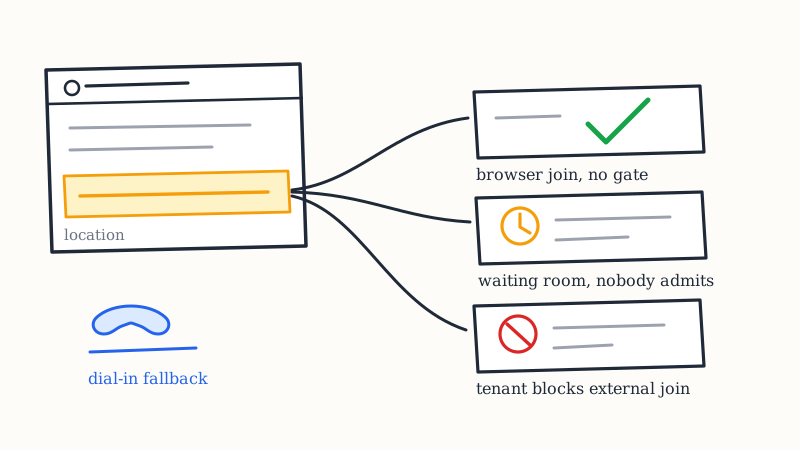
Almost nobody audits the one field that determines whether the prospect actually shows up: the join link.
This is a strange blind spot, because the link is the only part of the invite that has to work on infrastructure you do not control. Your title renders the same everywhere. Your description renders roughly the same everywhere. The join link has to survive the prospect’s calendar client, their browser, their corporate IT policy, their device, and in some cases their security team’s domain blocklist. Any one of those can turn an accepted meeting into an empty room.
And unlike a low acceptance rate, this failure mode is nearly invisible in your reporting. The invite was accepted. The meeting was on the calendar. The prospect does not join, you mark it a no-show, and you conclude the prospect was never serious. Often the prospect was sitting in a waiting room, or looking at a download prompt, or staring at an “ask to join” screen while you waited two tabs away.
This post is about which link to put in a cold invite, and why the answer depends on who you are sending to.
The location field is not one field
Before comparing platforms, it helps to know what a calendar invite actually carries, because “the meeting link” lives in up to three different places and they do not travel together.
An invite delivered as an iCalendar event has:
LOCATION: a free-text string. Anything you type here renders in almost every calendar client on every device. If it contains a URL, most clients make it tappable.DESCRIPTION: the body text. Also near-universal, though link formatting varies and some mobile clients truncate it behind a “show more” tap.- Platform-native conference data: Google attaches Meet details as structured conference data on the event, and Microsoft attaches an online meeting object to a Graph event. This is the part that renders as a pretty “Join with Google Meet” button in the native client.
That third one is the problem. Native conference data is the nicest experience when the prospect lives on the same platform as you, and it is the first thing to degrade when they do not. A Meet link attached as Google conference data may not surface as a button in Apple Calendar or in an older Outlook desktop client. The prospect sees an event with no visible way to join, shrugs, and gets on with their day.
The practical rule that falls out of this: put a plain-text join URL in LOCATION and in the first line of the description, regardless of what platform you use. Never rely only on the native button. It costs you nothing and it means the link survives every renderer.
The second practical rule, and this one bites more teams than it should: make sure you are not shipping two different links. If your sending calendar is on Google Workspace with “automatically add Google Meet video conferencing” switched on, and you paste a Zoom URL into the description, the invite now contains two valid join paths. The prospect clicks the button, because buttons win. You wait in Zoom. Both of you show up and the meeting still fails. Turn off the auto-add before you run a campaign on any other platform.
How each platform treats a stranger
The comparisons you find online are written for internal meetings, where everyone is signed into the same tenant. Cold outreach is the opposite case: the person joining is external, unknown to your directory, frequently on mobile, often signed into a personal account, and sometimes joining from a different email address than the one you invited. That changes the ranking completely.
Google Meet
What works: Browser-native. No download, no app, no passcode. On a Chromebook or an Android phone it is close to frictionless. If the prospect is on Google Workspace themselves, this is the smoothest option available.
What breaks: Meet decides whether you walk straight in or have to knock based on whether you are on the guest list and signed into a recognized account. Two cold-outreach realities trip this constantly.
First, the prospect forwards your invite to a colleague, or accepts from a different address than the one you sent to. They are now not the invited guest. Meet puts them in an “asking to join” state, and that request only clears if the organizer is already in the room watching for it. If your rep joins at two minutes past, the prospect has been knocking at an unattended door and has very likely closed the tab.
Second, if the prospect’s organization uses Google Workspace with restrictive external meeting policies, anonymous or external join can be limited outright.
Verdict: Excellent default for prospects whose companies run Google Workspace. Requires your rep to be in the room early, every time, to admit knockers.
Microsoft Teams
What works: If the prospect’s company runs Microsoft 365, and a large share of mid-market and enterprise B2B buyers do, a Teams link is the one their IT department already trusts. It will not be blocked, it will not look suspicious, and it is the client already open on their machine.
What breaks: External and anonymous join is governed by tenant policy on their side, not yours. Some organizations, especially in regulated industries, disable anonymous join or restrict meetings with untrusted external domains. When that policy is on, there is no workaround the prospect can perform in the moment. The join simply fails.
Teams also has the heaviest “wrong path” risk for an unprepared joiner. The browser path works, but the prompts can steer a non-technical prospect toward opening or installing the desktop client, which on a locked-down corporate laptop means a permission dialog they cannot clear.
Verdict: The right choice for enterprise and Microsoft-heavy buyers, with the caveat that you should always pair it with a dial-in number. The dial-in is the escape hatch when anonymous join is blocked.
Zoom
What works: The most platform-neutral option, and the one the widest range of buyers has used before. Nobody needs an explanation of what a Zoom link is. Dial-in comes standard. It behaves predictably on iOS, which matters more than people expect, because a meaningful share of cold prospects join from a phone.
What breaks: The defaults. Waiting room on, passcode required, and registration required are each individually capable of killing a cold meeting, and at least one is usually enabled on a stock account. A prospect who clicks your link and is asked to fill out a registration form is gone. A prospect who lands in a waiting room with no host present is gone within about ninety seconds.
Zoom also prompts harder than Meet to open the desktop app. The “join from your browser” option exists but is often a secondary link the prospect has to notice.
Verdict: The best single default when you do not know the prospect’s stack, but only after you have explicitly turned off the waiting room, removed the passcode requirement, disabled registration, and enabled browser join for that meeting.
Choosing per prospect, not per rep
The usual approach is that each rep uses whatever their company standardized on, and every prospect gets the same link. That is operationally simple and it is leaving meetings on the table, because the friction is entirely on the prospect’s side.
A better rule, and one you can actually automate off list data: match the link to the prospect’s platform, with a neutral fallback.
You can infer the prospect’s platform cheaply. The MX records on their email domain tell you whether they are on Google Workspace or Microsoft 365, and that is already a field you can enrich into your list alongside company and role. From there:
- Prospect on Microsoft 365, enterprise or regulated: Teams link plus dial-in number. Their IT trusts it. Dial-in covers the anonymous-join block.
- Prospect on Google Workspace: Meet link. Rep joins three minutes early without exception, to admit anyone who has to knock.
- Unknown, SMB, or mixed: Zoom with the defaults stripped out, plus dial-in. Maximum familiarity, minimum assumptions.
- Field, trades, logistics, or anyone likely to take the call from a vehicle: lead with a phone number, not a video link. A video invite to someone who will be on a job site reads as a scheduling problem, not a meeting.
This is the kind of per-prospect detail that is obvious in principle and never happens in practice, because it means a per-record decision rather than a template. It is also exactly the sort of thing a managed service should be handling for you. KALI generates and delivers the invites, personalizes each one from the signals in your list, and manages follow-ups and show-up reminders, so the join path can be set per record instead of per rep.
The “I will send a link after you accept” question
There is a school of thought that the cold invite should carry no link at all. The pitch reads something like “accept and I will send the joining details,” and the argument is that it feels less presumptuous.
It is a bad trade, for two reasons.
The first is mechanical. An invite with no join path is an event the prospect cannot act on. If your follow-up email with the link lands in a filtered tab, or they simply do not read it, the meeting arrives with nothing to click. You have reintroduced exactly the dependency on the inbox that calendar outreach exists to avoid. The entire reason an invite outperforms an email is that it stays visible on the calendar and is self-contained. Stripping the link makes it neither.
The second is that the presumption concern is misplaced. Prospects are not offended by a join link. They are offended by a meeting they did not agree to, and the link does not change that calculus either way. If your invite is going to feel pushy, it feels pushy with or without a URL in the location field.
What does work is a description that makes declining explicitly easy while still carrying a working link. Keep the join path in the invite, and keep the out in the text. That combination gets you a self-contained meeting and a low-friction exit, which is the right pair.
A test protocol worth running once a quarter
Nearly every link failure in cold outreach is discoverable in about fifteen minutes, and nearly nobody checks. Run this before a campaign and after any change to your conferencing settings.
Send a real invite from your production sending setup to four addresses you control:
- A personal Gmail account, opened in the Gmail web UI
- An Outlook.com or Hotmail address, opened in Outlook on the web
- An iCloud address, opened in Apple Calendar on an iPhone
- Any address, opened on a mobile browser while signed out of everything
For each, answer five questions:
- Is there a visible, tappable way to join, without opening or expanding anything?
- Does clicking it prompt a download or an app install before offering a browser path?
- Is there a waiting room, a passcode, or a registration form?
- Is there a dial-in number visible without scrolling?
- Is there exactly one join link, or did a platform silently add a second?
Any “yes” on the second or third question, or any “no” on the first, is a show-rate leak you can close today. The signed-out mobile browser test is the most valuable of the four, because it is the strictest version of the environment a real cold prospect joins from, and it is the one internal testing never replicates.
What this is actually worth
It is worth being honest about the size of this lever. The join link does not move acceptance rate much. Prospects do not inspect the URL before clicking accept, so the invite’s title, timing, and relevance are still what drive the 8 to 12 percent acceptance rates that calendar outreach produces against the 1 to 3 percent reply rates typical of cold email.
The link moves the number after that one: attendance on meetings already booked. Attendance on booked calendar-invite meetings typically runs in the 35 to 45 percent range, and it is supported by reminders and by how easy the meeting is to join. Every meeting lost to a waiting room or a blocked tenant is a meeting you already paid for with the invite, the personalization, the list, and the acceptance. That is the most expensive category of loss in the entire funnel, and it is the cheapest to fix.
Audit the field. Strip the defaults. Match the platform to the prospect. Put a plain URL in the location field and a dial-in number in the description, then go test it from a phone while signed out.
If you would rather not run that audit every quarter, KALI handles the sending infrastructure, the warmup, and the delivery mechanics as a managed service, so the join path is set correctly per prospect before the invite ever goes out.